


Piano Music & Songs
3.765.00 Reviews
App Specs
- Version
- 1.8.10
- Updated On
- License
- Free
- Downloads
- 10,000,000+
- Developer
- Indocipta Studio
- Categories
- Music
- Platform
- Android, iOS
Screenshots
 Analysis by AppCompare
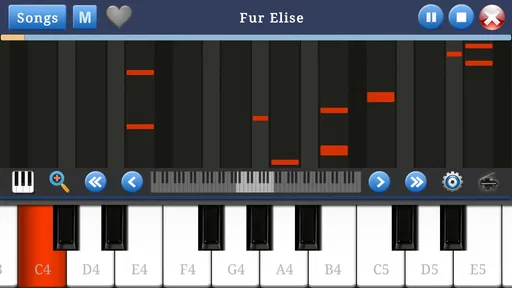
When I have a few spare minutes and no piano nearby, I want a music game that lets me start playing without turning the moment into a setup project. Piano Music & Songs is built around that simple appeal: open it, tap a keyboard, and spend a little time with familiar piano-playing gestures. It is a casual option for curiosity and quick practice, rather than a replacement for a real instrument or a structured course.
Starting with a few taps
The first useful question is what you want from a phone piano. If your goal is to explore notes, try a short melody, or see whether playing keys feels enjoyable, a touchscreen keyboard gives you an immediate place to begin. I would approach this game with that expectation: use it for a low-pressure first contact with piano, not as proof that you are learning proper technique simply by tapping along.
That distinction matters on a phone. Your fingers have far less room than they do on full-size keys, and the screen cannot reproduce the feel or resistance of an acoustic or digital piano. A tablet can make the playing area more comfortable, while a phone is best suited to simple phrases and short sessions. If you already own a keyboard, the app can still be a handy way to think through a musical idea when you are away from it.
Your Personal Piano Companion
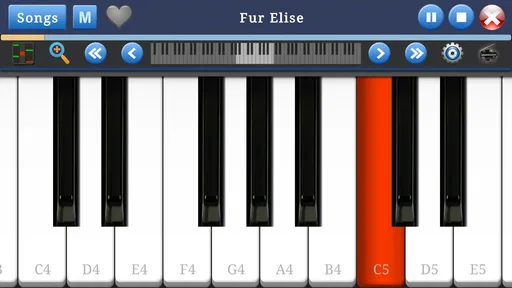
First off, let me just say how smooth and intuitive the Piano Music & Songs interface is. As soon as you open it, you’re greeted with a sleek, virtual keyboard that’s just begging to be played. It’s got that sleek design that’s easy on the eyes, yet functional enough to make you feel like a pro.
Features That Hit All the Right Notes
What really sets this app apart is its array of features designed to cater to users of all skill levels. Whether you’re a newbie or a seasoned player, there’s something here for everyone.
- Lessons Galore: The app offers a plethora of lessons that guide you from the basics to more advanced techniques. It's like having a piano teacher available 24/7.
- Song Library: You can play along with a vast library of songs ranging from classical to contemporary hits. It’s a great way to learn new pieces and show off your skills.
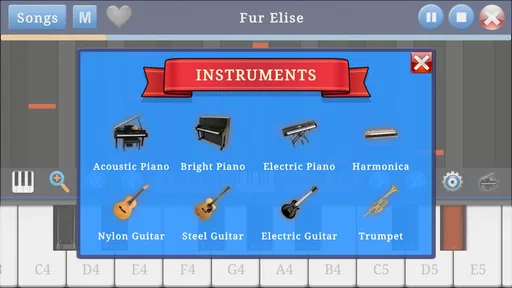
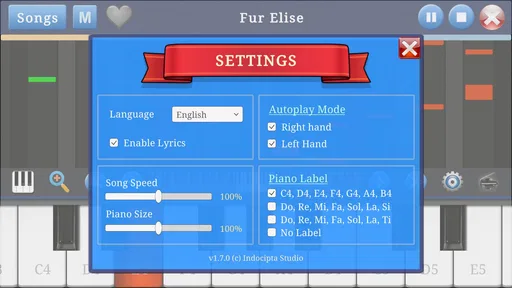
- Customizable Settings: Adjust the sound, size of the keyboard, and even the background to suit your mood. It’s like having a customizable concert just for you.
- Multi-Touch Support: This feature is a game-changer, allowing you to play chords and complex pieces with ease.
Turning play into a useful practice loop
The most helpful way to use a virtual piano is to give each short session a narrow aim. I might pick out a tiny melody by ear, repeat a chord change, or test whether both hands can reach the notes I have in mind. That creates a satisfying loop: choose a small musical task, hear the result immediately, adjust my tapping, and try again. The reward is not a formal score of musical ability; it is the clearer sound and steadier sequence I can produce after a few attempts.
For a beginner, I would keep the first goal modest: find a handful of notes, make a simple pattern, and repeat it without rushing. For someone who already plays, the same screen can be a scratchpad for remembering a tune or checking a rough arrangement. It is less useful for drilling finger independence or building reliable hand posture, because a touchscreen offers neither the spacing nor the tactile response needed for those habits.
Worth Reading Before You Choose

Flipboard Shows What News Apps Must Do Beyond the Feed

Switching to Android Auto Means Rethinking Your Driving Routine

Google Calendar Makes a Crowded Week Easier to Manage

Ludo King Makes the Most of the Minutes Between Plans

Baby Panda World Brings Quick Play to Modern Phones, but Its Game Library Feels Busy

ESPN’s Live Game View Makes Following Close Games Easier
Learning and Playing Made Fun
One of my favorite things about this app is how it makes learning fun. The lessons are interactive and engaging, breaking down complex pieces into manageable sections. You can slow down the tempo, loop tricky sections, or even mute one hand to focus on the other, making practice sessions more productive.
And if you’re someone who loves a challenge, the app features a leaderboard where you can see how you stack up against other players. It’s a nice little incentive to keep practicing and improving your skills.
Making a short session fit real life
A realistic use is a quiet break at home: I could open the game while waiting for tea to steep, spend a few minutes trying a melody, then put the phone down without needing to arrange a lesson or unpack an instrument. That kind of convenience is the strongest reason to keep a mobile piano around. It can also suit a family member who wants to explore music casually, especially when the aim is playful discovery rather than a promise of rapid progress.
For a more deliberate routine, I would choose one small target before opening it and stop when I have either managed it or learned what is tripping me up. Repeating the same short phrase is more useful than jumping between songs without listening closely. On a compact screen, I would also avoid trying to reproduce wide, fast chords; simplifying the phrase makes the exercise more comfortable and keeps the touchscreen from dictating awkward finger positions.
Where it sits beside other piano options
Compared with a conventional piano-learning app, a lightweight keyboard game is appealing when immediacy matters more than a complete study plan. A dedicated course or teacher is the better choice for posture, fingering, reading music, and feedback that responds to how you play. A physical digital piano is better still when you need realistic key spacing and touch. In contrast, this game’s value is that it puts a playable surface on a device you may already have, so you can experiment without committing to equipment or a long practice block.
That convenience has a trade-off: tapping notes on glass can make a melody recognizable without teaching the movements needed to perform it cleanly on real keys. I would treat any progress here as musical familiarity, not a substitute for instrument practice. If your main goal is to prepare for lessons or improve a piece for a recital, use the app as a memory aid between proper practice sessions, rather than as the practice itself.
A few practical expectations
The game is free to start, and optional in-app purchases range from about fifty cents to around a dollar and a half per item. I would begin with the free experience and decide whether the available play suits my routine before spending anything. Its Everyone age rating makes it broadly approachable, though younger players may still benefit from an adult helping them distinguish casual tapping from learning piano technique.
Indocipta Studio’s music game has an average rating of 3.7 from around 9,800 ratings, with over 10 million installs. It first appeared on November 6, 2016, and version 1.8.10 is listed for Android 7.1 or later. Those figures suggest that it has found a sizable audience, but they do not change the practical test: whether the keyboard and activities feel useful on your own device and for your own purpose.
One point worth planning around is connectivity: the song library and lessons need a stable internet connection. If you expect to use those parts during a commute or somewhere with unreliable Wi-Fi, check that your connection is available before settling in. For an offline moment, I would not count on those materials; the game makes most sense when you can access the content you intend to use.
A Few Notes to Keep in Mind
While the Piano Music & Songs app is pretty stellar, a stable internet connection is needed to access the song library and lessons. This might be a bit of a hiccup if you’re trying to practice in an area with spotty Wi-Fi.
Also, while the basic version of the app offers plenty to get started with, unlocking the full potential does require some in-app purchases. But honestly, given all the features, it’s a worthwhile investment for anyone serious about learning the piano.
Choosing whether to return
The reason to begin another session is simple: there is usually one more small musical idea to test. A phrase that sounded uneven can be tried again, or a melody can be approached at a calmer pace. I find that kind of restart more appealing than a strict practice timer because it lets curiosity decide when to continue. Still, casual repetition only helps if I pay attention to what I hear; mindless tapping can be entertaining, but it is not the same as focused practice.
I would recommend it to someone who wants an accessible piano-themed game, enjoys experimenting with melodies, or needs a quick musical diversion on a phone or tablet. I would steer a serious learner toward a real keyboard and a course or teacher, and anyone who needs uninterrupted offline lessons should plan around the connection requirement. The right choice depends less on ambition than on the job at hand: playful exploration is a good fit here, while technique and dependable long-term instruction call for a more complete setup.
Final Thoughts
In a nutshell, Piano Music & Songs is a must-have for anyone looking to dive into the world of music. Whether you’re a beginner or a virtuoso, this app offers a comprehensive, fun, and engaging way to improve your skills and enjoy playing the piano. So, if you’re ready to bring a little music into your life, give this app a try. Your inner musician will thank you!
Pros
- Intuitive interface for beginners.
- Wide range of song choices.
- High-quality sound output.
- Customizable learning paths.
- Offline mode available.
Cons
- Limited free content access.
- Ads can be intrusive at times.
- Occasional app crashes.
- In-app purchases are pricey.
- Requires internet for updates.
FAQs for Piano Music & Songs
What features does Piano Music & Songs offer?
Piano Music & Songs provides a wide range of features including a virtual piano keyboard, sheet music for popular songs, and interactive tutorials. Users can practice their skills with real-time feedback and access a library of songs across various genres. The app also offers customizable settings for tempo and difficulty levels.
Is Piano Music & Songs suitable for beginners?
Yes, the app is designed to cater to all skill levels, including beginners. It offers step-by-step tutorials and a simplified interface to help newcomers learn the basics of piano playing. The app’s interactive lessons provide guidance and tips to ensure a smooth learning curve for those new to the instrument.
Does the app require an internet connection?
While Piano Music & Songs can be used offline for playing the piano and accessing downloaded songs, an internet connection is necessary for downloading new content, updates, and participating in online challenges. It’s advisable to have periodic internet access to fully utilize all features and ensure the app is up-to-date.
Are there in-app purchases or advertisements?
The app is free to download and offers a variety of content at no cost. However, it includes optional in-app purchases for premium features such as exclusive song collections and ad-free experiences. Advertisements are present in the free version but can be removed with a subscription or one-time purchase.
Can I connect a MIDI keyboard to the app?
Yes, Piano Music & Songs supports MIDI keyboard connectivity. This feature allows users to enhance their playing experience by connecting a physical keyboard for more accurate practice and performance. The app provides instructions on how to connect and configure your MIDI device for optimal use.


